So, I'm set up with all the tools to write an Android app, give it a pretty interface, and test it. So this seems to open the question - what do I want it to do?
There are thousands of apps already available, to do almost anything imaginable. You can get an app to play The Sims. You can replace your touchscreen keyboard. You can add an archery scoring tool.
According to the might wiki, there are 450,000 apps for Android! How can I do something that's never been done before?
Well, bluntly, I can't. I may not even be able to do something better than it's been done before. That's okay though - it means rather than searching Google Play with ever odder search terms to find something that hasn't been done before, I can just come up with something that seems achievable and get cracking.
I've been spending a lot of time lately helping my fiancée in planning our wedding (for anyone interested in that side of things, her blog as linked there is a good place to start) and the number of lists and pieces of paper to keep track of everything is insane!
Everything has a different timescale; different participants; costs to budget for; and so on.
Basically it is one of the largest events that people are likely to find themselves organising in a non-professional context. Maybe I can do something to help?
Thinking about this, I can think of a lot of things that an 'ideal' version of wedding planning software would do for you. The key thing is to start with a core functionality that's actually useful and then add capabilities once the core is up and running - otherwise it becomes a huge project for one person, I have to learn a lot more before I can get started, and I'm more likely to give up with it incomplete!
Ideal Version:
Keep track of budget - how much things cost and what proportion is paid for.
Keep track of RSVPs - to the main event/reception (if separate), hen and stag.
Replace all the little bitty notes - to-do lists, records, contact details, ideas.
Count-down - knowing what day is W-Day, and being able to categorise tasks by 12 months before, 6 months before, the day before, day of the wedding, whatever.
Tracking primary responsibility for tasks - is the groom handling the music? Is the bride mostly dealing with the caterers?
Be able to synchronise between multiple devices - the bride and groom, and possibly also the best man, maid of honour, ushers, even parents.
With the above, ideally be able to output something (be it a spreadsheet, Google Doc, whatever) to a computer for handling on a larger screen.
BACK UP AUTOMATICALLY - this is a big deal. The more of the critical pieces of paper that are moving onto an Android, the more careful we need to be that one inopportune crash, or getting your phone nicked, won't mess everything up; and relying on busy people to manually backup is going to lead to some failures. I have no idea how easy this is - have to look into it later.
That's quite a lot of features, and different pages within the app, all of which would have to interact smoothly with one another. What's the core of it? I reckon the combination of a to-do list and count-down will do the trick - key reasons being I think it's enough to be useful, but it doesn't require interacting with other phones or linking to PC; it will have easy room for expansion in noting responsibility for tasks; and phones are obviously *already* good for noting contact details, so integrating those into the app aren't the highest priority.
So some form of calendar function - allowing you to set your date, then keeping track of a countdown; then an ability to enter notes with target completion dates; ability to check back previously created notes; and probably a display with the next few tasks. That sounds like a pretty good initial feature list to me.
I can start breaking that down into what I'll actually need code-module-wise next time. Then I can give myself a specification - to write code able to perform these functions - and then I can maybe start writing some actual code!
Showing posts with label introduction. Show all posts
Showing posts with label introduction. Show all posts
2012/03/22

2012/03/21
Beginnings 2: Software and Tools
So now we know why I'm doing this, let's have a look at what I'm using to do it!
First off for any programming, it's good to have a solid Integrated Development Environment, or IDE. It is possible to write code using Notepad and then compile it with a standalone compiler, but that's like saying it's possible to write a novel without having proofreaders - you're making your life more difficult, and at the end of the day the results will be worse.
To compare code in an IDE with the same code hand-typed:

So here we have a Java "Hello World!" program.
You can see that there is colour-coding for common elements - the declarations are purple, comments are in green, and the string "Hello world!" is blue.
What you can't see is that Eclipse has automatically indented lines as they are typed; nor that when you open a brace { or parenthesis ( it closes them.
It will even, when you type System. show a list of possible continuations.
Then if you, say, forget the semi-colon to end a line, it will highlight that line as problematic and suggest you add it.
 And here is the equivalent hand-typed.
There's no indentation, so it's harder to see what is going on; and with all the text the same colour doesn't help.
If I forget a piece of syntax, or misspell a command here, the first I know of it will be when the compiler throws an error. Not fun.
So, an IDE is essential - but which one to use?
I have chosen Eclipse. Primarily, this is because Eclipse is a very popular IDE for the Java family of languages - and Androids run on a form of Java. It is also because Eclipse is free (yay! says my wallet) and open source (yay! say my principles).
Eclipse can be found here.
Once you've installed Eclipse, you need to add the right attachments to make it work with Androids. It's like buying an electric drill - you need the right drill bit to do the job.
Specifically, you need the Android Development Tools (ADT), and the Android Software Development Kit (SDK). Fortunately, there's a very good tutorial on the whole process here to walk you through that.
Once you've done this, Eclipse doesn't just have the usual advantages of an IDE - you can also run virtual Android devices with a variety of specifications, to test your program on more phones than just the one in your pocket! (More testing is always good...)
So far so good. I've added two more bits'n'bobs which look as though they may be useful, and offer functionality which is lacking in Eclipse:
DroidDraw, which is a visual environment for laying out interfaces and screens. Hopefully when it comes to prettying up an app, this will make the process reasonably simple. DroidDraw is found at this site, which not only has the downloads, but also tutorials on how to get started with it.
SQLiteBrowser, which is a database manager, found (among other places) here. I've added this because it may help with handling storage and retrieval of data.
Last thing to mention:
Scrap paper and a pencil/whiteboard and a pen can also come in handy; especially for planning out the outline of a program before you jump in and start coding.
Next Steps: So what do we want an app for?
First off for any programming, it's good to have a solid Integrated Development Environment, or IDE. It is possible to write code using Notepad and then compile it with a standalone compiler, but that's like saying it's possible to write a novel without having proofreaders - you're making your life more difficult, and at the end of the day the results will be worse.
To compare code in an IDE with the same code hand-typed:
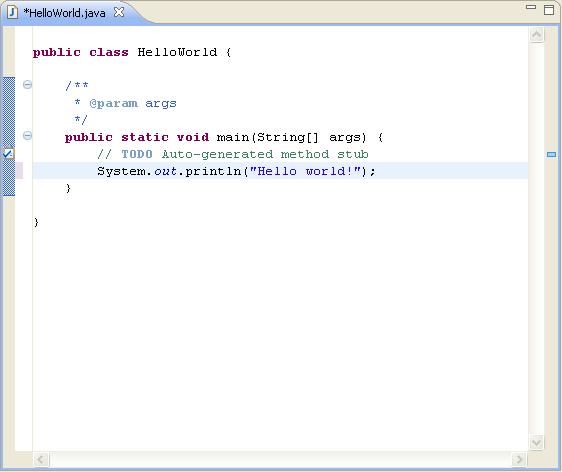
So here we have a Java "Hello World!" program.
You can see that there is colour-coding for common elements - the declarations are purple, comments are in green, and the string "Hello world!" is blue.
What you can't see is that Eclipse has automatically indented lines as they are typed; nor that when you open a brace { or parenthesis ( it closes them.
It will even, when you type System. show a list of possible continuations.
Then if you, say, forget the semi-colon to end a line, it will highlight that line as problematic and suggest you add it.

There's no indentation, so it's harder to see what is going on; and with all the text the same colour doesn't help.
If I forget a piece of syntax, or misspell a command here, the first I know of it will be when the compiler throws an error. Not fun.
So, an IDE is essential - but which one to use?
I have chosen Eclipse. Primarily, this is because Eclipse is a very popular IDE for the Java family of languages - and Androids run on a form of Java. It is also because Eclipse is free (yay! says my wallet) and open source (yay! say my principles).
Eclipse can be found here.
Once you've installed Eclipse, you need to add the right attachments to make it work with Androids. It's like buying an electric drill - you need the right drill bit to do the job.
Specifically, you need the Android Development Tools (ADT), and the Android Software Development Kit (SDK). Fortunately, there's a very good tutorial on the whole process here to walk you through that.
Once you've done this, Eclipse doesn't just have the usual advantages of an IDE - you can also run virtual Android devices with a variety of specifications, to test your program on more phones than just the one in your pocket! (More testing is always good...)
So far so good. I've added two more bits'n'bobs which look as though they may be useful, and offer functionality which is lacking in Eclipse:
DroidDraw, which is a visual environment for laying out interfaces and screens. Hopefully when it comes to prettying up an app, this will make the process reasonably simple. DroidDraw is found at this site, which not only has the downloads, but also tutorials on how to get started with it.
SQLiteBrowser, which is a database manager, found (among other places) here. I've added this because it may help with handling storage and retrieval of data.
Last thing to mention:
Scrap paper and a pencil/whiteboard and a pen can also come in handy; especially for planning out the outline of a program before you jump in and start coding.
Next Steps: So what do we want an app for?
2012/03/20
Beginnings 1: Whys and Wherefores
Who am I, and why am I doing this?
I'm young, highly qualified and unemployed. There's a lot of it about, oddly enough. I want to get a job developing software, and part of the problem is that my formal programming education is slim; so I need pieces of work to point to, an "I did that!" I am learning to write Android apps partly just to improve my skills, and partly to build up a portfolio of work which I can show to prospective employers.
Why blog about it? Self-discipline, primarily. If I know that the results are public, I have more motivation to push on through the debug phases, the design crises, etc. With the added possibility of showing the blog itself to people.
Why Android, not iOS?
1) I have an Android phone, and it's much more appealing to write an app I can use myself.
2) I have an Android phone, so I have a test-bed in my pocket.
3) Getting an app out on the Android Market (or Google Play, as it seems to be now) is a lot easier than getting one onto the Apple Store.
4) I just prefer the Android philosophy of an open platform.
Coming soon: Software and Tools.
Subscribe to:
Posts (Atom)